
6E Club WinGo
WinGo is the busiest room in the 6E Club lobby. One number from 0 to 9 is drawn at the end of each countdown, and that number decides every choice in the round.
Learn the screen once and every timer after that feels the same.
6E CLUB WINGO ROOM
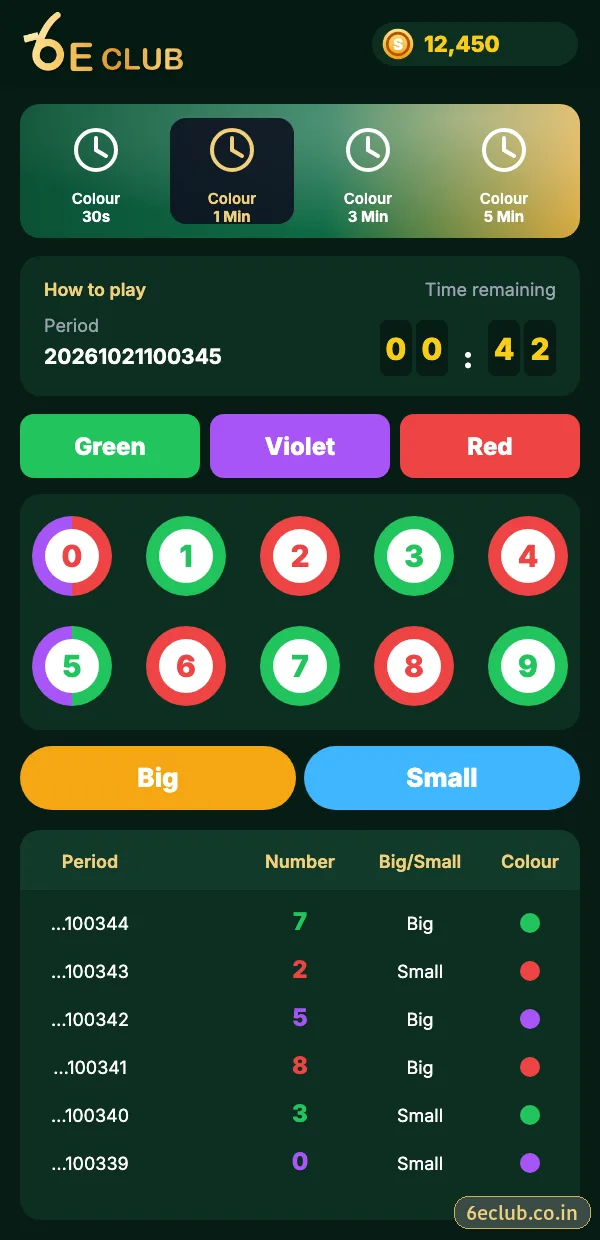
6E Club WinGo screen
Timer tabs, period number, colour buttons, number balls, Big/Small and the history tabs.
On this page
The five 6E Club WinGo timers
| Timer | Rounds per hour | Best for |
|---|---|---|
| 30 seconds | ≈120 | Experienced players only |
| 1 minute | 60 | Short sessions |
| 3 minutes | 20 | Learning the game |
| 5 minutes | 12 | Relaxed pace |
| 10 minutes | 6 | Slowest, most time to think |
Every timer uses identical rules. The only difference is pace – and pace is what decides how quickly a session runs away from you.
Reading the WinGo screen
- Period number – the unique ID of the round.
- Countdown – choices close in the last five seconds.
- Green, Violet, Red – colour choices.
- Balls 0–9 – exact number choices.
- Big / Small – 5–9 or 0–4.
- Multiplier chips – x1, x5, x10 and so on.
- History tabs – Game history, Chart and My history.
Colours, numbers and sizes
| Number | Colour | Size |
|---|---|---|
| 0 | Red + Violet | Small |
| 1 | Green | Small |
| 2 | Red | Small |
| 3 | Green | Small |
| 4 | Red | Small |
| 5 | Green + Violet | Big |
| 6 | Red | Big |
| 7 | Green | Big |
| 8 | Red | Big |
| 9 | Green | Big |
The full colour map, with worked examples, is on 6E Club colour prediction.
Making a choice in WinGo
- Pick a timer tab.
- Tap a colour, a number or Big/Small.
- Choose the chip value and multiplier in the pop-up.
- Confirm before the countdown reaches the final five seconds.
- Watch the result appear and check it in Game history.
Game history, Chart and My history
Game history lists every period with its number, colour and size. Chart shows how often each number has appeared and the longest streaks. My history lists your own choices. All three describe the past – none of them predicts the next round.
WinGo vs Trx WinGo
6E Club Trx WinGo uses the same board, but the number comes from a public TRON block hash that anyone can look up. If you ever wonder whether a result was fair, Trx WinGo lets you check.
Sensible WinGo habits
- Start in the 3, 5 or 10-minute room.
- Watch a few rounds before choosing anything.
- Keep chip sizes the same all session.
- Set a time limit and stop when it is reached.
- Ignore anyone selling “sure” predictions.
Knowing when to close the WinGo room
WinGo never pauses, so the decision to stop is always yours. Good moments to leave: when your timer rings, after a few rounds that did not go your way, or as soon as you notice you are choosing faster than usual. Closing the room at those points is the single most useful 6E Club WinGo habit.
If you want variety, switch to 6E Club K3 or 5D instead of speeding up. A change of room is often enough to reset your focus.
A sample 6E Club WinGo session plan
| Stage | What to do |
|---|---|
| Before | Pick the 5 or 10-minute room and set a 20-minute alarm |
| First rounds | Watch only; read Game history |
| Middle | Keep the same chip size every time |
| End | Stop when the alarm rings, whatever the last result |
The plan looks simple because it is. Most problems in WinGo come from changing the plan halfway through a session, not from the rules themselves.
WinGo terms you will see
| Term | Meaning |
|---|---|
| Period | The unique number of a round |
| Multiplier | How many times your chip value is applied |
| Big / Small | Numbers 5–9 / 0–4 |
| Violet | The extra colour on 0 and 5 |
Start with 6E Club the safe way
Use the official 6E Club app or website – one 6E Club account works on every device.
Frequently asked questions
Which numbers are violet in 6E Club WinGo?
0 and 5.
Is 5 Big or Small?
Big – 5 to 9 are Big.
Which WinGo timer is best for beginners?
The 3, 5 or 10-minute room.
Can WinGo be predicted?
No – each round is independent.