
6E Club Register
Opening a 6E Club account takes around a minute. All you need is an Indian mobile number that receives SMS, a fresh password and, if you have one, an invite code.
Below we go through each field on the 6eclub sign-up screen, explain what the app checks, and list fixes for the errors people run into most.
6E CLUB REGISTRATION SCREEN
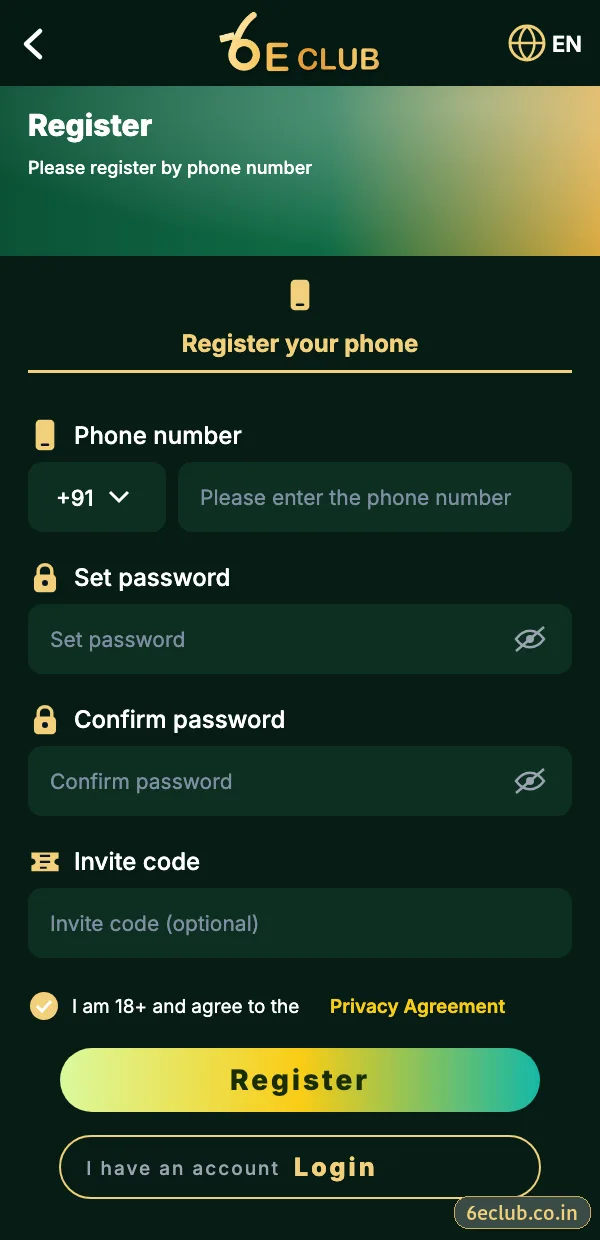
6E Club register screen
Phone number, set password, confirm password, invite code and the 18+ agreement.
On this page
- 6E Club register at a glance
- How to register on 6E Club, step by step
- Registration details
- Registered account vs browsing as a guest
- Choosing a password you will remember
- Eligibility and fair play
- Fixes for common 6eclub sign-up problems
- What to do right after registering
- Why your mobile number matters so much
- Registering on the website vs the app
- A quick 6E Club registration checklist
- Registration with an invite code vs without
- FAQs
6E Club register at a glance
Registration creates one 6E Club account that works in the Android app, the iPhone home-screen app and any browser. Your mobile number becomes your login ID and the place where reset codes arrive, so pick a number you plan to keep for years rather than a spare SIM.
There is no form to fill with documents, no fee and no waiting period. As soon as the SMS code is accepted the lobby opens and you can read the rules of every game before deciding whether to play.
How to register on 6E Club, step by step
- Open the official 6E Club app or website and tap Register.
- Keep the +91 prefix and type your ten-digit number with no leading 0.
- Enter a password of at least eight characters in Set password.
- Type the same password in Confirm password – by hand, not by pasting.
- Add an invite code if someone shared one; otherwise leave the box empty.
- Tick the box confirming you are 18+ and accept the user agreement.
- Tap Register and enter the six-digit SMS code.
- The lobby opens and your new UID appears at the top of the Account page.
Registration details
| Item | Details |
|---|---|
| Cost | Free |
| Time needed | About one minute |
| Login ID | Your mobile number |
| Verification | Six-digit SMS code |
| Invite code | Optional, sign-up only |
| Minimum age | 18 |
Registered account vs browsing as a guest
| Registered | Not registered | |
|---|---|---|
| See the lobby and rules | Yes | Partly |
| Join rounds | Yes | No |
| Check-in, gift codes, VIP | Yes | No |
| Invite code of your own | Yes | No |
| Customer support | Full | General questions only |
Choosing a password you will remember
Three unrelated words plus a number – something like “river-lamp-cotton-42” – is easy to remember and hard to guess. Avoid your name, birthday, phone number or anything you already use for email, UPI or banking. If you share a phone with family, do not let the browser save it.
Eligibility and fair play
- You must be 18 or older.
- One account per person and per mobile number.
- Use your own number and your own password.
- No scripts, auto-clickers or modified apps.
- Do not register on behalf of someone else.
Fixes for common 6eclub sign-up problems
“Phone number already registered”
You already have a 6E Club account – use 6E Club login or forgot password instead of signing up again.
“Passwords do not match”
Retype both boxes by hand; pasting often adds an invisible space.
SMS code not arriving
Check the number, the active SIM, DND settings and signal, then wait for the timer before tapping resend.
“Invalid invite code”
Clear the box and register without it, or ask the person for the code again.
Register button does nothing
Tick the 18+ box and correct any field showing red text.
What to do right after registering
- Note your UID somewhere safe.
- Change the default nickname.
- Bind an email as a backup login.
- Switch on login alerts.
- Install the 6E Club app so you stay signed in.
- Read the rules of one game before your first round.
Why your mobile number matters so much
Your number is your 6E Club login ID, your password-reset channel and the way customer care confirms who you are. If you register with a SIM you later lose or stop recharging, recovering the account becomes slow. Choose your main number, keep it active, and bind an email as a second key.
Registering on the website vs the app
| In the 6E Club app | On the website | |
|---|---|---|
| Speed | Fast | Fast |
| Stays signed in afterwards | Yes | Only while cookies last |
| Best when | You already installed the APK | You want to try 6E Club before installing |
Both create exactly the same account. Many people register on the website first, then install the 6E Club app later the same day.
A quick 6E Club registration checklist
- Your own Indian SIM is in the phone.
- You have a new password ready (not used anywhere else).
- Any invite code is copied and checked.
- You are on the official app or website, not a link from a chat.
- You are 18 or older.
Registration with an invite code vs without
| With invite code | Without | |
|---|---|---|
| Account features | Identical | Identical |
| Linked to a friend or agent | Yes | No |
| Can be changed later | No | No |
An invite code simply records who introduced you. It does not change your account, your games or your results. If you are unsure about a code, leaving the box empty is perfectly fine – see 6E Club invite code for how the system works.
Start with 6E Club the safe way
Use the official 6E Club app or website – one 6E Club account works on every device.
Frequently asked questions
Is 6E Club registration free?
Yes, completely free.
Do I need a 6E Club invite code?
No – it is optional, but it can only be entered during sign-up.
Can I register with only an email?
No – register with a mobile number and bind an email afterwards.
How long is the SMS code valid?
A few minutes; request a new one if it expires.
Can I have two 6E Club accounts?
No – one account per person and number.