
6E Club Daily Check-in
The 6E Club daily check-in gives a small reward each day you open the app, growing over a seven-day streak.
Here is how it works, what resets it and how to keep it in proportion.
6E CLUB CHECK-IN
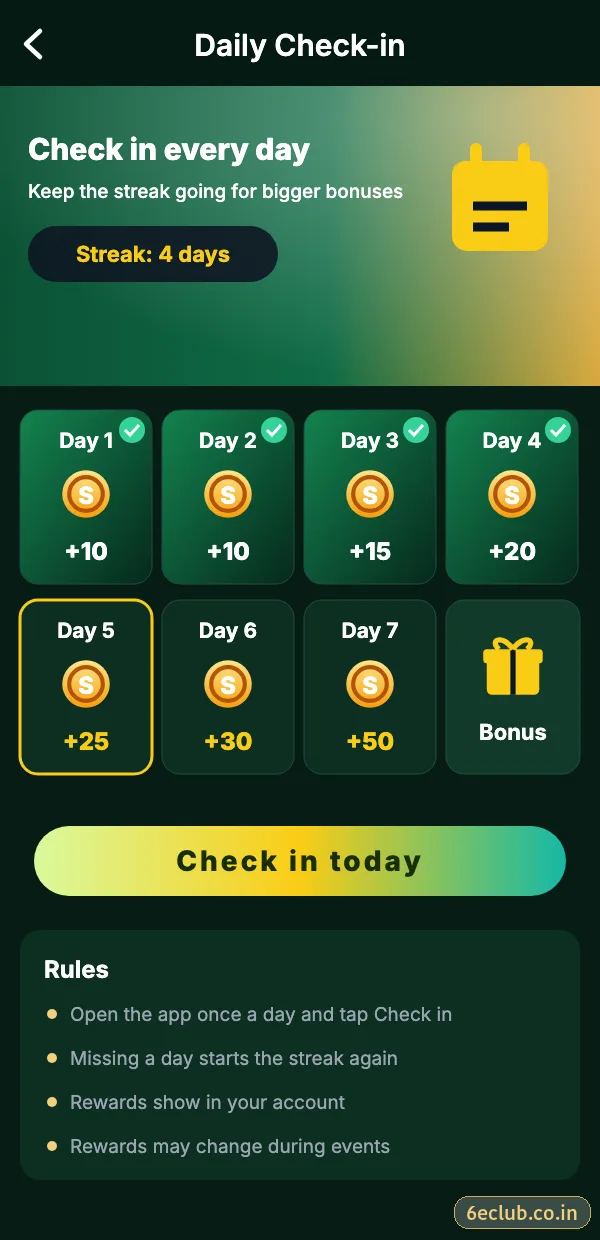
6E Club daily check-in screen
Seven-day calendar with the reward for each consecutive day.
On this page
How to check in on 6E Club
- Log in to 6E Club.
- Open the Events or Activity tab.
- Tap Daily check-in.
- Tap today’s box to claim it.
How the streak works
| Streak | What to expect |
|---|---|
| Day 1–3 | Small reward each day |
| Day 4–6 | Slightly larger reward |
| Day 7 | Largest reward of the cycle |
| Missed day | Streak usually resets to Day 1 |
Exact rewards change with campaigns, so the check-in screen itself is the reliable source.
Check-in vs gift codes vs VIP
| Reward | How often |
|---|---|
| Daily check-in | Every day you open the app |
| Gift code | Irregular, from the official channel |
| VIP level | When activity crosses a threshold |
Keep it in proportion
Checking in takes ten seconds and does not require joining a single round. If you notice the streak pulling you into longer sessions, let it reset – a small daily reward is never worth extra play.
- Claim, then close the app if you had no plan to play.
- Turn on reminders only if they help, not if they tempt you.
- Missing a day is fine.
Start with 6E Club the safe way
Use the official 6E Club app or website – one 6E Club account works on every device.
Frequently asked questions
Where is the 6E Club daily check-in?
In the Events or Activity tab.
What happens if I miss a day?
The streak usually restarts from Day 1.
Do I need to play to check in?
No – just open the app and tap today’s box.